PDF to Markdown converter
Turn a PDF into editable Markdown. Free, no account needed.
Start here
How to use & helpLeave blank for all pages. Use original PDF page numbers.
Images and layout options
Loading the converter… No file is uploaded by this converter.
We collect basic usage statistics; your PDF and its text stay on this device. Privacy details
Need a hand? See common fixes or contact support (new tab).
Keep this tab open. Progress counts processed pages, not verified text. You can Cancel or Clear at any time; no time estimate is promised.
Recognize scanned pages
Low-resolution, faint or watermarked scans can produce missing or incorrect words; always check names, numbers and table relationships against the PDF.
How recognition works
Only pages with no extracted text are eligible; existing text-layer pages stay unchanged. Language models load from this site on demand and may be cached locally. Recognition uses extra time and memory in your browser. It does not repair an incomplete text layer or restore original formatting.
Compare scanned-page text
Retry uses whitespace-based regions and contrast adjustment; it can also make mistakes. Each preview shows up to 20,000 characters. Your current output stays unchanged until you choose.
Current result
Enhanced candidate
Your draft output
Review your Markdown
Unzip before opening document.md. Keep images/ alongside it. Copy, Save as and Download .md contain image references only.
If the browser did not save your file:
In an app browser, downloads may not be supported. Try the same page in Chrome or Edge, or use Copy and save the text in an editor. The file is generated on this device.
Check before you save
Page-by-page hints and extraction limits
These hints describe the initial extraction, not the result after edits or cleanup. They do not verify reading order or table reconstruction and can miss problems or flag correct content.
Basic preview
Preview supports inferred headings, bullet lines and simple Markdown tables. Long results use a shortened preview; Copy and Download keep the full editable Markdown. Generated source-page images can appear in the preview. It displays extracted text safely; embedded HTML, scripts and Markdown links are not executed.
Review repeated headers and footers
Only exact short lines in the outer 5% of at least 3 selected pages are considered. Page numbers, scanned pages and ambiguous matches are kept.
Compare a source page with its Markdown
Original PDF page
Markdown for this page
Saved page text
The source image is rendered locally only while comparing. Markdown keeps editable structure, not the PDF's exact fonts or layout. Saved page edits are protected from OCR. Full-document editing below pauses page editing and OCR until you reconvert; download your edits first. Clear or choosing a new file removes local edit history.
A real, reproducible example
See what changes before using your own PDF
Our self-created, two-page sample has a text page with headings, a list and a simple table, followed by an image-only page. This is the tool's actual default output, without manual corrections. Basic mode leaves table values as text lines; the image-only page needs optional OCR.
Download original PDF · Download actual Markdown
View original page and actual Markdown
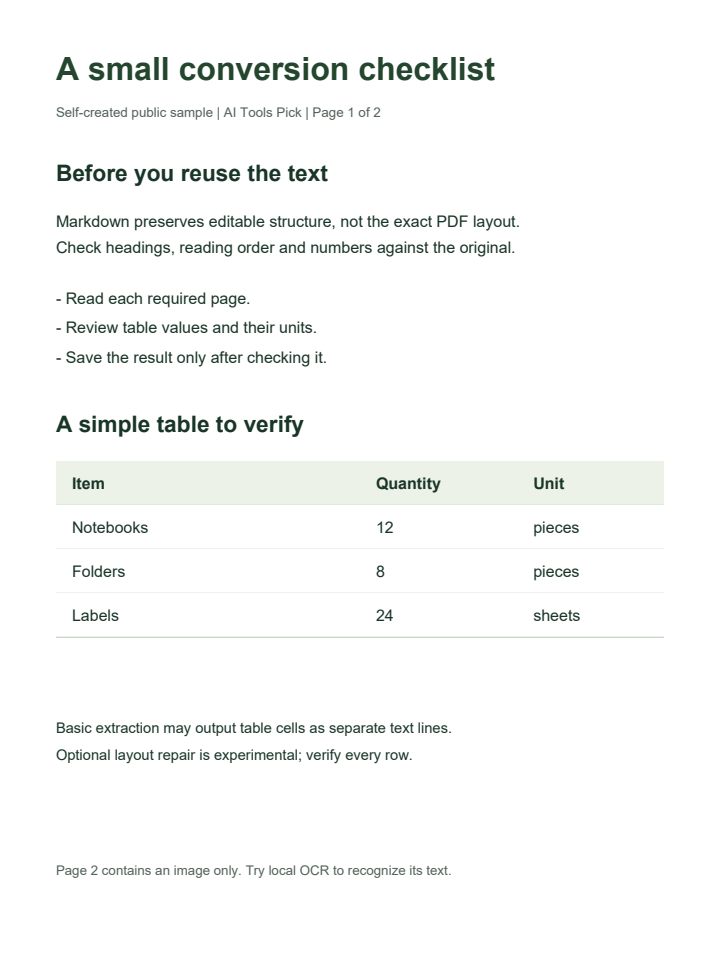
Actual default Markdown · both pages
Open this example to load the actual output.
Three steps
Choose, convert, then save
- Choose PDF, or use Try a sample. For selected pages or a ZIP with whole-page images, enter the page range above or enable images in Images and layout options before conversion.
- Convert to Markdown. Use the separate OCR controls for pages with no extracted text. Open page comparison to check important passages and make corrections.
- Download .md for text, or Download ZIP + images if you enabled page images. Unzip the bundle with document.md beside images/. Download again after saving edits.
Keep this tab open until you have saved your output. Clear, a new file or reconversion can remove your current work.
Know the limits
Text extraction, with a review step
Optional browser OCR recognizes printed Chinese (Simplified or Traditional), English, French, Spanish or Russian only on pages with no extracted text. It does not repair pages that already have a text layer, transcribe handwriting reliably or isolate individual figures. Optional source-page images preserve each whole page visually in a local ZIP; diagrams are not editable and extracted figure labels may remain in the text. Experimental layout mode can reconstruct some simple numeric tables and two-column pages. It can misidentify layouts; merged cells, multiline tables, formulas and link destinations are not reconstructed. Heading detection is a size-based guess. Page-specific review hints can help you spot possible layout problems, but they do not verify the conversion. The editable output is limited to 500,000 characters.
For image-only pages, convert first and use the scanned-page recognition prompt, or read the OCR workflow (new tab). For complex documents, see online and local alternatives (new tab).
If something gets in the way
Common fixes
The converter does not start or the PDF will not open
Check the message beside Convert. The source file must be a readable PDF up to 20 MB and 100 total pages. A password-protected file needs an accessible copy you are authorized to use. If the reader could not load, save any existing output before reloading or trying Chrome or Edge.
A page is blank or the reading order is wrong
For pages with no extracted text, choose a language in Recognize scanned pages and run OCR. Use page comparison to check the source. Existing text-layer pages are not automatically re-OCRed; tables and columns may need corrections even when layout repair is enabled.
I clicked Download but cannot find the file
Check your browser's downloads. The download controls provide Save .md again, Open text and .txt fallbacks after a download request. Copy is another way to keep the Markdown. In an app browser, try the tool in Chrome or Edge. Keep this tab open while you save.
The Markdown has no images
Enable Include source-page images (ZIP) in Images and layout options before converting, then download and unzip the image ZIP. Keep document.md beside images/. These are whole-page PNGs; Download .md and Copy do not include the image files themselves.
Still stuck? Email support with a short issue description (new tab). The support page has a template; your PDF and output are not attached automatically.
What happens to your file?
Conversion code reads your selected file in this browser. It does not upload the PDF, send its contents or filename to analytics, or save the output on our server. Clear the tool or close the page to release the working copy. Any downloaded .md or ZIP file stays where you save it.
The PDF reader, fonts and optional OCR engine/language models are served from this site. OCR pixels and recognized text stay on this device; only reusable language models may be cached in browser storage. Hosting services still process ordinary page and asset requests. Basic Google Analytics usage statistics load automatically in an isolated frame that cannot read the converter document or its files. The notice above links to the details; no statistics choice is required to use the tool. The rest of this site uses its existing analytics configuration. This does not protect against browser extensions or other software on your device.
Usage statistics details
Fixed events record tool visits, file selection, sample trials, text conversion, OCR, enhanced retries, comparison actions, successful copying, cancellation and download requests. Text conversion, ordinary OCR and enhanced retry have separate start, completion and failure events. Google also receives ordinary network and browser/device information. No document name, contents, page count, error text, output, download URL or referring-page details are sent by our event code. A completed conversion is not a quality assessment, and a download request is not proof of a saved file. The frame is hosted on our separate pages.dev domain and cannot access the converter. Google may use analytics cookies and browser/device identifiers during visits; browser restrictions mean visitor counts may not represent unique people. Browser or network blocking can cause missing events.
Powered by Tesseract.js (license) and Mozilla PDF.js · Apache 2.0 license · Site privacy policy
Make the result useful